

Setting up a home theater system shouldn’t feel like solving a puzzle, yet many people find themselves staring at the back of their TV, wondering which cable to use. If you’re trying to connect a soundbar, AV receiver, or sound system to your television, you’ve probably encountered two main options: HDMI ARC and optical audio. Both promise better sound than your TV’s built-in speakers, but which one should you choose? Which one is best HDMI ARC vs optical
Let me walk you through everything you need to know about these two popular audio connections, so you can make the right choice for your setup.
HDMI ARC vs Optical
Understanding the Basics
Before we compare these technologies, let’s clarify what each one actually does.
HDMI ARC stands for Audio Return Channel. It’s a feature built into HDMI cables that allows your TV to send audio back to your sound system through the same HDMI cable that might be carrying video. Instead of needing separate cables for different functions, one HDMI connection handles everything.
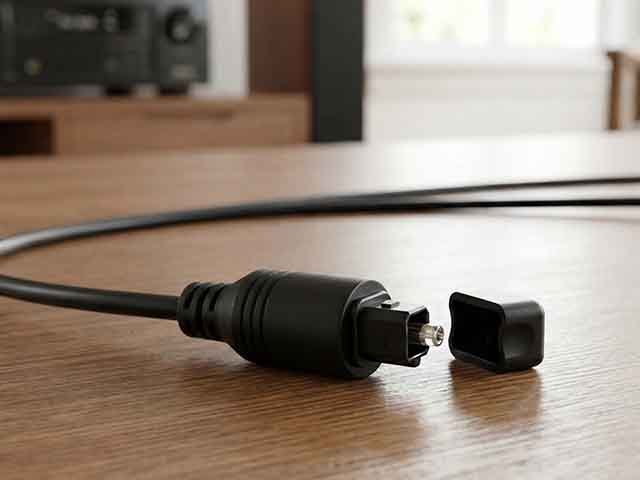
Optical audio (also called TOSLINK or digital optical) uses fiber optic cables to transmit audio signals as pulses of light. You’ll recognize the optical port on your devices by its distinctive square shape with a small hinged door, often labeled “Optical Out” or “Digital Audio Out.”
Both methods transmit digital audio, which means you’re getting cleaner sound than old analog connections. However, they differ significantly in what they can deliver and how they function in your entertainment setup.
Also Read
Best Streaming Box for your Home Theatre
Audio Quality: What Can Each Connection Handle?
This is where things get interesting. The audio formats these connections support will directly impact your listening experience.
Optical audio has been around since the 1980s and remains perfectly adequate for many situations. It supports Dolby Digital and DTS formats, which means you can enjoy 5.1 surround sound. For most casual viewers watching cable TV, streaming shows, or even many movies, optical delivers excellent audio quality. The sound is crisp, clear, and noticeably better than TV speakers.
HDMI ARC takes things further. It supports all the formats that optical does, plus higher-quality options like Dolby Digital Plus. More importantly, if you have HDMI eARC (enhanced Audio Return Channel), you unlock support for premium formats like Dolby Atmos and DTS:X. These advanced formats create immersive, three-dimensional soundscapes that can include overhead audio effects.
Think of it this way: if optical audio gives you surround sound, Dolby Atmos gives you surround sound plus height channels that place sounds above you. When a helicopter flies overhead in a movie, you’ll actually hear it moving through the space above your seating position.
The bandwidth difference explains these capabilities. Optical maxes out around 1 Mbps, while HDMI ARC handles up to 1 Mbps for standard ARC and up to 37 Mbps for eARC. That extra bandwidth makes all the difference for uncompressed and high-resolution audio formats.
Ease of Use and Control
Here’s something many people don’t consider until they’re using their system daily: remote control convenience.
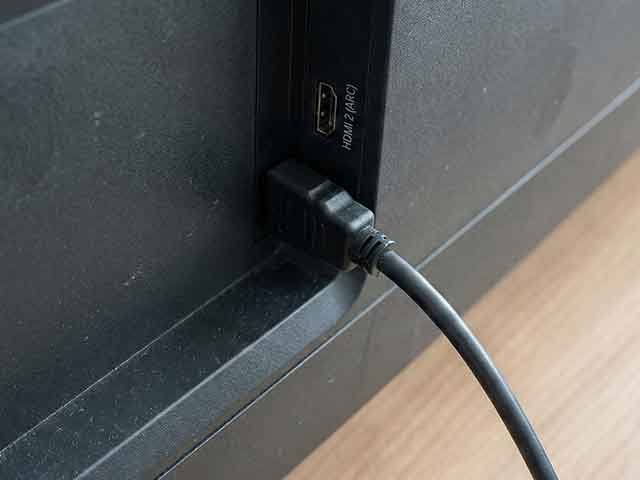
HDMI ARC supports something called CEC (Consumer Electronics Control), which lets different devices communicate with each other. What does this mean for you? When you turn on your TV, your soundbar automatically powers on. Adjust the volume with your TV remote, and your soundbar responds. Turn everything off with one button, and your entire system shuts down together.
I can’t overstate how convenient this becomes in everyday use. No more juggling multiple remotes or remembering which remote controls what. Everything just works together seamlessly.
Optical connections don’t offer this integrated control. You’ll need to manage your soundbar or receiver with its own remote. It’s not a dealbreaker, but after experiencing the simplicity of HDMI CEC, going back feels like a step backward.
Connection and Compatibility Considerations
Let’s talk about what you’ll actually find on your devices.
Most modern TVs from the last five years include at least one HDMI ARC port, usually marked as such. Many TVs from 2019 onward feature HDMI eARC on select models. Check your TV’s specifications or look for labels on the HDMI ports themselves.
Optical ports remain common but are gradually becoming less standard on newer, slimmer TV models. Some manufacturers are phasing them out in favor of HDMI-only designs. However, if you’re working with equipment that’s a few years old, you’ll almost certainly have an optical port available.
Here’s an important detail: HDMI ARC requires an HDMI cable, but not just any HDMI cable. For eARC features, you need a high-speed HDMI cable (the kind marked “with Ethernet”). Most modern HDMI cables meet this standard, but older cables in your drawer might not. Optical cables are optical cables—there’s no confusion about versions or specifications.
If your TV has HDMI eARC but your soundbar only has standard ARC, the connection will work, but you’ll be limited to standard ARC capabilities. The system defaults to the lowest common denominator.
Real-World Scenarios: Which Should You Choose?

Let me break this down based on common situations:
Choose HDMI ARC/eARC if:
You have a modern TV and sound system (made within the last 3-4 years). The equipment supports these features, so why not use them? You’ll get better audio format support and easier control.
You’re building a high-end home theater. If you’re investing in Dolby Atmos speakers or a premium soundbar, you absolutely need HDMI eARC to take full advantage of your equipment. Using optical would be like buying a sports car and only driving it in first gear.
You value convenience and integrated control. The CEC functionality makes your daily experience noticeably smoother. This might seem minor until you’re using the system every day.
You’re planning for the future. Audio technology continues advancing, and HDMI eARC positions you to take advantage of new formats as they become available.
Choose Optical if:
You have older equipment that lacks HDMI ARC. Your TV or sound system might not support ARC, making optical your best digital audio option.
You’re experiencing HDMI handshake issues. Sometimes HDMI devices don’t communicate properly, causing audio dropouts or other frustrations. Optical provides a simple, reliable connection that just works without negotiation between devices.
You only need basic surround sound. If you’re watching cable TV, using streaming services with standard audio, and don’t plan on upgrading to Atmos content, optical delivers perfectly adequate quality.
You want a dedicated audio connection. Some users prefer keeping audio and video signals completely separate. There’s nothing wrong with this approach if it matches your preference.
| Feature | HDMI ARC / eARC 🏆 | Optical (Toslink) |
| Primary Use | Modern TVs, Soundbars, Home Theaters | Older Receivers, Legacy Audio Gear |
| Max Audio Quality | Uncompressed (High Resolution) | Compressed (Lower Resolution) |
| Surround Sound | Supports 5.1, 7.1, and Dolby Atmos | Supports up to 5.1 Surround Sound |
| Remote Control (CEC) | Yes (Control volume with TV remote) | No (Requires separate remote) |
| Lip-Sync Correction | Automatic (Auto-Sync) | Manual (Often requires adjustment) |
| Cable Durability | High (Standard copper cable) | Low (Fragile glass/fiber core) |
| Video Signal | Handles Audio & Video | Audio Only |
| Bandwidth Speed | Very High (up to 37 Mbps on eARC) | Low (Max 384 kbps) |
Common Problems and Solutions
Both connection types can occasionally present challenges. Here’s what to watch for:
With HDMI ARC, the most common complaint involves CEC not working properly. Different manufacturers implement CEC slightly differently, sometimes causing compatibility issues. If you encounter problems, check your TV’s settings menu for CEC options (it might be called Anynet+, Bravia Sync, or another brand-specific name) and ensure it’s enabled.
Audio lip-sync issues can affect either connection, but seem more common with optical. Most TVs and soundbars include audio delay settings to fix synchronization between picture and sound. You’ll find these adjustments in the audio settings menu.
If you’re not getting the audio formats you expect through HDMI ARC, dive into your TV’s audio settings. Some TVs default to converting everything to basic stereo or Dolby Digital, even when better formats are available. Look for a passthrough or bitstream option.
The Bottom Line
For most people setting up a home theater system today, HDMI ARC is the better choice. It offers superior audio quality potential, especially with eARC, and the integrated control makes everything more convenient. If you’re buying new equipment or your existing gear supports it, go with HDMI ARC.
However, optical isn’t obsolete. It remains a solid, reliable connection that many people will never outgrow. If you’re watching standard streaming content and don’t have ambitions for a high-end Atmos system, optical will serve you well for years to come.
The real question isn’t which technology is objectively better—it’s which one better matches your specific equipment, content, and expectations. Take stock of what you have, think about where you want your system to go, and choose accordingly.
Whatever you decide, both connections will deliver dramatically better sound than your TV’s built-in speakers. That’s the upgrade that truly matters. The choice between these two technologies is really about optimizing your experience rather than achieving basic improvement.
Now you can approach those ports on the back of your TV with confidence, knowing exactly which cable to reach for and why it’s the right choice for your home theater setup.
FAQ (HDMI ARC vs optical)
1. Does an Optical cable provide better sound quality than HDMI?
No. HDMI ARC (and especially eARC) provides better sound quality. Optical cables are limited in bandwidth, meaning they must compress high-quality audio signals (like 7.1 surround or Dolby Atmos) to fit through the cable. HDMI eARC supports uncompressed, full-resolution audio, making it superior for modern sound systems.
2. Can I get Dolby Atmos through an Optical cable?
Generally, no. Optical cables do not have the bandwidth to carry full, uncompressed Dolby Atmos (TrueHD). While some streaming apps might try to squeeze a compressed version of Atmos over an optical connection, it is rare and unreliable. For a true Dolby Atmos experience, you must use HDMI ARC or eARC.
3. Does using an Optical cable affect my TV’s picture quality?
No. Optical cables carry audio signals only. They have absolutely no connection to the video signal and will not degrade or improve your TV’s picture quality in any way.
4. Which is better for gaming: HDMI ARC or Optical?
HDMI ARC/eARC is better for gaming. Modern consoles (PS5, Xbox Series X) output uncompressed sound (LPCM) and use advanced features like VRR (Variable Refresh Rate). HDMI allows for perfect lip-sync correction and uncompressed surround sound, whereas Optical can cause audio lag (lip-sync issues) and cannot handle uncompressed multi-channel audio.
5. Why is there a red light coming out of my Optical cable?
That is normal! “Optical” stands for Optical Fiber. These cables transfer audio data using pulses of light (lasers/LEDs) instead of electricity. The red light indicates that the cable is active and transmitting a signal. Note: Never look directly into the port or the end of the cable.
6. Can I use both HDMI ARC and Optical at the same time?
Technically, yes, you can plug both in, but your TV will usually only output sound to one at a time. You will have to manually switch between “Audio System (HDMI)” and “Optical” in your TV settings. There is rarely a benefit to connecting both to the same soundbar.
7. Do I need a special HDMI cable for ARC to work?
For standard HDMI ARC, no. Any decent “High Speed” HDMI cable purchased in the last 10 years will work. However, if you want to use eARC for Dolby Atmos, it is highly recommended to use an “Ultra High Speed” HDMI 2.1 cable to avoid audio dropouts.